
- Classes
- Making an object from a class is called instantiation, and
you work with instances of a class.
class Dog:
    """A simple attempt to model a dog."""
    def __init__(self, name, age):
        """Initialize name and age attributes."""
        self.name = name
        self.age = age

    def sit(self):
        """Simulate a dog sitting in response to a command."""
        print(f"{self.name} is now sitting.")

    def roll_over(self):
        """Simulate rolling over in response to a command."""
        print(f"{self.name} rolled over!")
first define a class called Dog. By convention, capitalized names refer to classes in Python.
then write a
docstring describing what this class does.
A function that’s part of a class is a method.
The __init__() method is a special method that Python
runs automatically whenever we create a new instance
based on the Dog class.
The self parameter is
required in the method definition, and it must come first,
before the other parameters. It must be included in the
definition because when Python calls this method later (to
create an instance of Dog), the method call will automatically
pass the self argument. So you don't need to provide a value.
Any variable prefixed
with self is available to every method in the class, and we’ll
also be able to access these variables through any instance
created from the class. They are called attributes.
my_dog = Dog('willie', 6)
print(f"{my_dog.age} is {my_dog.name}'s age")

print(my_dog.name)
print(my_dog.age)
6 is willie's age
willie
6my_dog is an attribute of instance created from the class Dog
put a dot after the attribute of an instance to access the value.
- Calling Methods
my_dog = Dog('willie', 6)

my_dog.sit()
my_dog.roll_over()
willie is now sitting.
willie rolled over!Again, put a dot after the attribute to call methods within the class
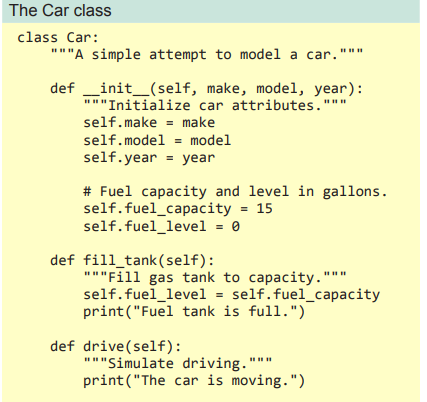
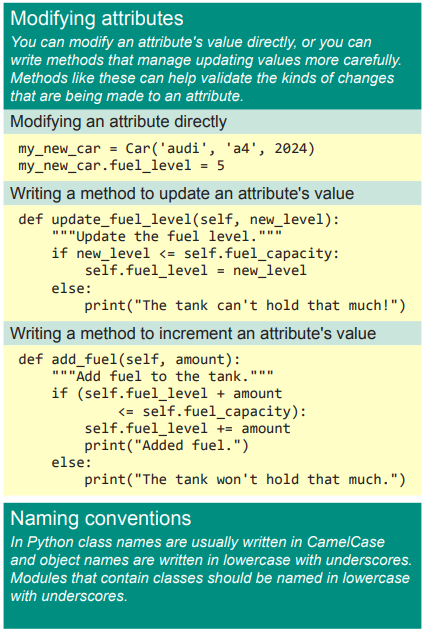
- Setting a default value for an attribute
- When an instance is created, attributes can be defined
without being passed in as parameters. These attributes can
be defined in the __init__() method, where they are
assigned a default value.
- Inheritance
- When one class inherits from another, it takes on the attributes and
methods of the first class. The original class is called the
parent class, and the new class is the child class.
Parent Class:
class Car:
	"""A simple attempt to represent a car."""

def __init__(self, make, model, year):
        """Initialize attributes to describe a car."""
        self.make = make
        self.model = model
        self.year = year
        self.odometer_reading = 0

def get_descriptive_name(self):
        """Return a neatly formatted descriptive name."""
        long_name = f"{self.year} {self.make} {self.model}"
        return long_name.title()

def read_odometer(self):
        """Print a statement showing the car's mileage."""
        print(f"This car has {self.odometer_reading} miles on it.")

def update_odometer(self, mileage):
        """Set the odometer reading to the given value."""
        if mileage >= self.odometer_reading:
            self.odometer_reading = mileage
        else:
            print("You can't roll back an odometer!")

def increment_odometer(self, miles):
		"""Add the given amount to the odometer reading."""
		self.odometer_reading += miles
Child Class:
class ElectricCar(Car):
	"""Represent aspects of a car, specific to electric vehicles."""
def __init__(self, make, model, year):
	"""Initialize attributes of the parent class."""
	super().__init__(make, model, year)

my_leaf = ElectricCar('nissan', 'leaf', 2024)
print(my_leaf.get_descriptive_name())
1. The name of the parent class must be included in parentheses in the definition of a child class
2. The __init__() method takes in the information required to
make a Car instance
3. The super() function is a special function that allows you
to call a method from the parent class. This line tells Python
to call the __init__() method from Car, which gives an
ElectricCar instance all the attributes defined in that
method.
class ElectricCar(Car):
    """Represent aspects of a car, specific to electric vehicles."""

    def __init__(self, make, model, year):
        """Initialize attributes of the parent class."""
        super().__init__(make, model, year)
        self.battery_size = 40

    def describe_battery(self):
        """Print a statement describing the battery size."""
        print(f"This car has a {self.battery_size}-kWh battery.")

# Creating an instance of ElectricCar
my_leaf = ElectricCar('Nissan', 'Leaf', 2024)

# Using methods from both parent class Car and subclass ElectricCar
print(my_leaf.get_descriptive_name())
my_leaf.describe_battery()
Added a new attribute self.battery_size and set its initial
value to 40
This attribute will be associated with all
instances created from the ElectricCar class but won’t be
associated with any instances of Car
and Car cannot use methods from the subclass
*You can override unnecessary methods from the parent class by copying it exactly and re-adjust docstrings and its codelines inolved
- Instance as AttributeBreaking a large class with lots of attributes and methods into smaller classes is called composition
class Car:
--snipped--

class Battery:
    """A simple attempt to model a battery for an electric car."""

    def __init__(self, battery_size=40):
        """Initialize the battery's attributes."""
        self.battery_size = battery_size

    def describe_battery(self):
        """Print a statement describing the battery size."""
        print(f"This car has a {self.battery_size}-kWh battery.")

class ElectricCar(Car):
    """Represent aspects of a car, specific to electric vehicles."""

    def __init__(self, make, model, year):
        """
        Initialize attributes of the parent class.
        Then initialize attributes specific to an electric car.
        """
        super().__init__(make, model, year)
        self.battery = Battery()

my_leaf = ElectricCar('Nissan', 'Leaf', 2024)
print(my_leaf.get_descriptive_name())
my_leaf.battery.describe_battery()
I snipped class Car: for readability
Now there's a new class Battery which is not a subclass but a different class
my_leaf.battery is an instance as an attribute, (.battery) this could be any irrelevant variable.
my_leaf.battery.describe_battery() means it's creating an instance accessing the method within the class Battery
- Saving a class as module and importing it
A module containing the class named Car saved as import_test
You can save multiple classes in a module and also import multiple classes
from module_name import * imports all classes from the module
Class names should be written in CamelCase. To do this,
capitalize the first letter of each word in the name, and
don’t use underscores. Instance and module names should
be written in lowercase, with underscores between words.
- Python Standard Library
One interesting function from the random module is
randint(). This function takes two integer arguments and
returns a randomly selected integer between (and including)
those numbers.
Here’s how to generate a random number between 1 and
6:
>>> from random import randint
>>> randint(1, 6)
3
Another useful function is choice(). This function takes in a
list or tuple and returns a randomly chosen element:
>>> from random import choice
>>> players = ['charles', 'martina', 'michael', 'florence','eli']
>>> first_up = choice(players)
>>> first_up
'florence
'Python > Python Crash Course' 카테고리의 다른 글
| Python Crash Course: 챕터 11 (0) | 2024.07.12 |
|---|---|
| Python Crash Course: 챕터 10 (0) | 2024.07.10 |
| Python Crash Course: 챕터 8 (1) | 2024.07.01 |
| Python Crash Course: 챕터 7 (0) | 2024.06.29 |
| Python Crash Course: 챕터 6 (0) | 2024.06.28 |